Looking for a Speed Dial 2 Alternative? Here's What I Built Instead
A close look at Speed Dial 2's strengths and pain points, and how Snapmarks approaches bookmark organization differently.
If you’re searching for a Speed Dial 2 alternative, you’ve probably run into one of two things: a specific limitation that’s bugging you, or a review mentioning that features you used to get for free are now behind Pro. I’ve been on both sides of that experience myself — I was a lifetime Speed Dial 2 subscriber, and newer features have landed behind additional paywalls since then. That’s actually part of what pushed me to build Snapmarks.
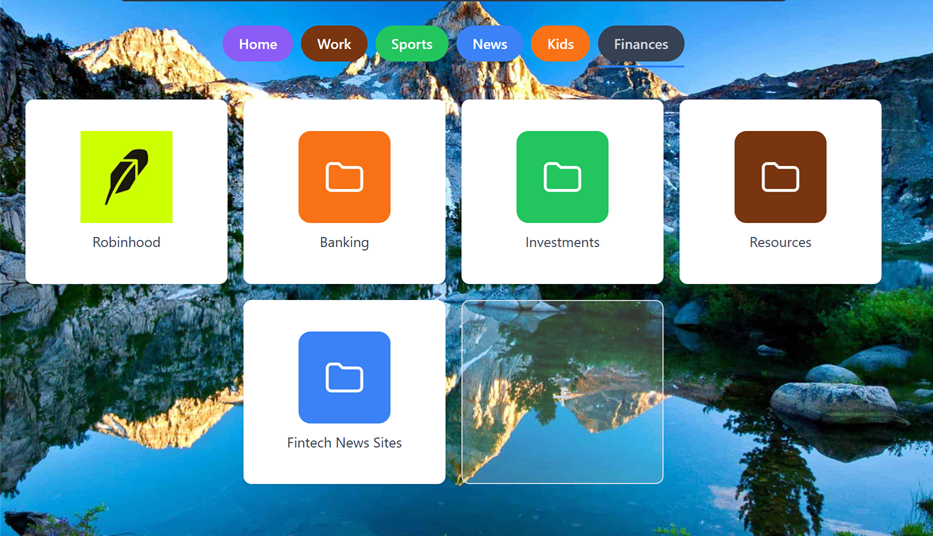
In the image above, you can see a category called Finances. In that category, you can have direct bookmarks as well as sub-categories, as we can see here: Banking, Investments, Resources, and Fintech News Sites.
This isn’t a takedown. Speed Dial 2 has real strengths — it’s been around since 2011, has a loyal user base, and does the basics well. But after using it for years, a few specific gaps kept showing up for me, and they became the starting point for how I designed Snapmarks.
Organization: sub-categories and cleaner navigation
Speed Dial 2 organizes bookmarks into flat groups. If your bookmarks don’t fit that flat structure — say, a “Work” group that really needs its own sub-sections for different clients or projects — you’re stuck flattening everything into one level. Snapmarks supports nested sub-categories, so you can actually mirror how your bookmarks are organized in your head instead of forcing everything into one tier.
Related to this: in Speed Dial 2, if you have more groups than fit in the visible viewport, selecting one means scrolling past the edge of the page to find it. I built Snapmarks so category selection never requires scrolling off-screen — everything you need to pick from stays in view.
Drag-and-drop that actually covers the workflow
See more video tutorials in our Tutorials section.
Drag-and-drop in Speed Dial 2 is fairly limited — reordering within a group works, but that’s about where it stops. In Snapmarks, drag-and-drop covers:
- Reordering bookmarks within a category
- Moving bookmarks directly between categories
- Moving entire categories to a different parent category
- Clear, visible drop-zones so you always know exactly where something will land before you release it
That last point matters more than it sounds — ambiguous drop targets are a common source of frustration in speed-dial-style tools, where you’re never quite sure if you dropped something in the right place until after the fact.
Icons that don’t fall back to broken placeholders
If you’ve used Speed Dial 2 for a while, you’ve probably seen the generic “image not found” icon show up more often than it should. Icon fetching is one of those details that’s easy to overlook until it’s inconsistent. Snapmarks puts real effort into reliable icon resolution, so your dial actually looks like the sites it represents instead of a grid of broken image placeholders.
Finding things: tags and fuzzy search
Speed Dial 2’s search is functional but fairly literal. Snapmarks adds tagging on top of categories, so you can cut across your folder structure when you’re looking for something (e.g., all your “recipes” tagged bookmarks, regardless of which category they live in). Combined with fuzzy search, you don’t need to remember the exact title or URL — close enough gets you there.
Bulk operations, free
This is the one that surprised me most when I went looking into other users’ experiences. Reading through independent reviews of Speed Dial 2, a recurring pattern shows up: features that used to be free — thumbnail/screenshot handling and custom icon options among them — have moved behind Pro over time. Bulk multi-select operations are one of the features gated this way. In Snapmarks, bulk editing bookmarks is a core feature, not an upsell.
Why I built it this way
None of this is to say Speed Dial 2 is bad — plenty of people are happy with it, and it clearly does enough right to have kept a large user base for over a decade. But if you’ve felt any of these specific frictions — flat organization, scrolling for folders, limited drag-and-drop, inconsistent icons, or features disappearing behind a paywall — those are exactly the problems I set out to solve with Snapmarks.
If that sounds like what you’re after, give Snapmarks a try — it’s free to get started, and the features described above aren’t locked behind a tier.